Showing posts with label RAW vs. JPEG. Show all posts

Monday, October 25, 2010

Quick Hit Monday: New Ansel Adams Book; Animoto Does Lightroom; 3T Western Digital Drive Announced; Lots of Lightroom Freebies; and More

Good Afternoon Everybody,

I have to tell ya' - having the weekend off after a pretty long haul of working sure was a good way to charge the ol' NiCad's. Heck, LaDawn and I even got a chance to fit a movie in over the weekend.

Sitting On DeckFall around the Midwestern parts of the country have been beautiful. It has been just amazing sitting on the deck, breathing the fresh air, and enjoying the fall breezes while sipping on an adult beverage  ;~)

Anyway, today is Monday and it's time to get back to work - and a pretty busy week it is. Today we play "catch up" around the studio, pack up and head to Columbus, OH for tomorrow's CBTL2010 tour presentation.

Then it's back to Cincy on Wednesday for my brand new Rocket Speed Digital Design Webcast [link]. LaDawn, who is truly our LumaPix:FotoFusion guru, will be co-presenting with me.

We worked on the program a bit yesterday and it's shaping up to be the best 2 hours ever on the greatest design software on the planet. Like I said Friday, I'm going to show you some money-making things you never even thought you could do with LumaPix during the webcast. Yes, you can still register right here.

The rest of the week is quite busy with a BIG Bat Mitzvah coming up next weekend. Then it's off to California for the wrap up of the tour - I can't believe it's almost over, and just in time for the holiday rush.

Hey gang, that's this week's quick prevue and since it's going to be a busy one, let's get right to today's post. Here we go...

New Ansel Adams Book Hits The Shelves

Ansel in Parks I've always been a big fan of Ansel Adams and have several of his books. Ansel is the photographer that has inspired me for my scenic's and landscapes. I'll keep trying to aspire to his level of excellence. Anyway, in my leisurely weekend cruise of some of my favorite sites, I saw that blogging buddy, Jim Goldstein, had a book review of the latest Ansel Adams collection of images entitled, "Ansel Adams In The National Parks” [link].

Here is an excerpt:

"Ansel Adams In The National Parks excels in that Andrea G. Stillman, the books editor, has pulled not just amazing photographs from the Adams archive, but also his writing & correspondence that breath life into an otherwise historical photo anthology.

I guess what I'm picking up here in his review is that we get a peak at what Mr. Adams was thinking as he created his wonderful images with his own notes accompanying many of the images. I've been an Ansel Adams fans for years, and even talked with him on the phone once - for real. I'm heading to Amazon to order the book. Here is the link to Jim's entire review.

Just When You Thought You Were Running Out Of Storage Space

3T Drive Western Digital just introduced their brand new 3 terabyte hard drive - cost, only $269! [link] I still remember when I bought my first 1T drive for $700. It sounds like a "ton" of storage, but it also sounds like it takes a lot more time to backup too.

You know, in our digital world, things continue to get cheaper, faster, and better and that's a good thing. I would just hate to face that one mighty crash. What I would like to see is a faster, easier way to back up 50 gigs of raw file image data from a wedding shoot inexpensively on Blu-Ray DVD's.

Delkin offers archival Blu-Ray disks at about $25 a pop or $20 bucks at B&H [link] - to expensive for me. But, I did see that Panasonic just announced archival discs to be shipping by the 3rd quarter of this year [link]. No price announced yet (maybe $10 ea.) - let's wait and see.

Histogram - RAWAnd Speaking Of RAW Files

One of our DPT readers pointed me to this very thorough discussion of how to best shoot RAW files over at Ron Day’s blog [link]. The discussion on exposure was especially illuminating. It's a "geek" read but well worth the time to get your best results when shooting RAW. Enjoy!

Cool Lightroom Features, Freebies, and More

Don't you just love to take a weekend Internet cruise now and then? I like to think of it as a "Duck Tour" for the brain;~). Anyway, this week's foray into the cyberspace yielded some pretty cool Lightroom finds.

Here is the quick list:

Animoto Now Does Lightroom!
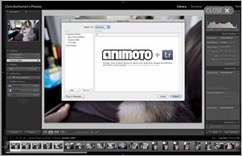
Animoto plus Lightroom That's right, select your images from within Lightroom 3 and send them on their way to  Animoto.com. I'm a BIG fan of Animoto and Lightroom so I'm thrilled to see this new integration. It's just one more easy way to sizzle your client's experience for you and your studio. Here is the link to the announcement and the plug-in.

Adding Edges To Your Images In Lightroom

LR3 EdgesHere is another little tutorial gem I stumbled on over the weekend. I found it at TipSquirrel.com [link] - a nice little Lightroom/Photoshop resource for digital photographers. Anyway, this tutorial - here is the link - shows a clever way to use the Identity Plate in Lightroom to add edges to an image. Heck, the author even points you the free edges he uses - pretty cool idea.

Lightroom Freebies

LR3 Free Presets That's right, more Lightroom freebie presets that you can fit into tour hands! OnOne Software has lots of cool stuff over at their site, but some of the coolest are the links to all the FREE presets they have made available to you and me! [link]

Adobe Guru, Jack Davis, is the brains behind many of the 190 of the Lightroom presets. I have to say, they do look pretty cool. Wait, there's more - explore OnOne's site and you will find 196 more free downloads including edges, Adobe RAW plug-ins, and more. Here is the link again. I think, I've died and gone to Lightroom heaven ;~). Have fun.

_________________________________________________________

Hey gang, that's it for me today. In a few hours, we are packing our bags and heading north to Columbus, OH. We are catching up with our friends, Kent and Sarah Smith, this evening. Then tomorrow it presentation #17 of CBTL2010 tour. We are expecting another large crowd of over 200 strong so I hope to see you there. Please come up and say HI.

Can't make it, then still plan to stop by DPT for a brand new Technique Tuesday: The Other Side Of David Ziser. There, that should keep you guessing a bit ;~) It will fun, I promise.

See ya' then, David

Monday, November 17, 2008

Confession Day Monday: I'm Out Of the Closet -I'm A RAW Shooter and My New Economic Stimulus Package

Good Morning Everybody,
Well, we arrived, safe and sound, albeit, a bit jet-lagged, but we’ll be fine by later today. We are here this week with many friends from the Cincy area to see the opening of a play in London’s West End – more on that later this week. Anyway, I love visiting this country – so much history, beauty, and adventure. I’ll keep you posted as the week progresses. In the mean time, let me offer you…

I'm Out Of the Closet -I'm A RAW Shooter
Okay, I have to admit it, I've come kicking and screaming to the RAW side. I've been taking flack for shooting JPEG's for the last eight years. The flack has come from my fellow professional photographers, fellow trainers in the field, and several thousand attendees at my seminars.

I had the images to prove that you can indeed produce a great print off of a JPEG. I was showing 24 x 36 inch images at every presentation I gave. I had it figured out - my exposures were dead-on 99% of the time, I was able to shoot quickly and keep within the tight exposure parameters that being a JPEG shooter demanded. I loved the fact that I could backup a wedding in only five gigs of space as opposed to 50 gigs of space if I shot it in RAW.

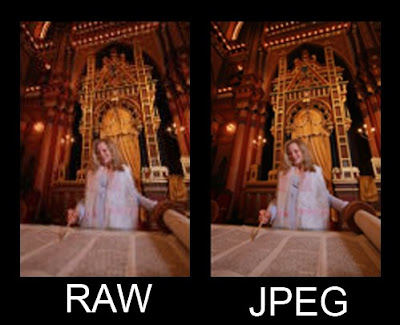
RAW Image tweaked in Lightroom:


JPEG Image tweaked in Lightroom:
That's where I was. I was ready to stand my ground. I had a whole slew of jokes that I gingerly tossed back to the RAW shooters in the crowd. Things like, “RAW was for sushi and oysters only.” Or “It takes a real photographer to shoot a JPEG. We've got a nail the exposure every time.” And, lastly, “What does RAW really stand for.... R-eally A-wful W-orkflow?” I’d stoke the crowd, encouraging the JPEG shooters to join me - cheering my remarks.

In my heart I knew all this was really just in good fun. I always thought, if you get a great image shooting JPEG then, go for it. If you prefer to shoot RAW, then fine, shoot raw. For me it just wasn't much of a religious argument. And you know, there are three religious digital arguments out there.

1. Mac versus PC;
2. Canon versus Nikon; and
3. RAW versus JPEG.

For me, I always just wanted to get the best looking image I could. I was a film shooter - I always worked for dead-on exposure. I brought that over to my digital shooting and JPEG's filled the bill just fine.

What changed my mind? Was caused me to come out of the closet after shooting RAW for the past eight months and keeping it a secret? What made me switch? It was Adobe’s Lightroom. Check out the two images posted here - I wish you could see the difference more clearly, but on my 27 inch monitor, the first image just sizzles with detail and color. The second - a Jpeg - just doesn't. Playing with these two images in Lightroom was the start of the turning point for me.

When I opened the RAW image, started to play with the Lightroom sliders, and my eyes opened wide-eyed and my jaw dropped low when I saw all the results I was getting with my RAW image. In all honesty, I was really surprised at the range of control I had over my RAW image and how I could make the colors and details pop! The ability to recover the highlights easily in Lightroom, to add the fill light were needed, and to give the image that added vibrancy tweak is what really made me think much more seriously about shooting RAW.

I can remember kind of smiling to myself when I decided to shoot raw for the first time, that is, to shoot the entire event and RAW. I kept thinking myself, do I have enough cards. I mean, normally I'm shooting about 3000 to 4000 images on the job - see Related Links below.

Shooting that many images at a much higher file size, that meant I was going to be packing a whole lot of pixels in my camera bag when I came home. I did the math, bought some new flash cards, and resigned myself to shoot at first wedding and JPEG raw format.

I also have to admit I was really concerned about the hard drive real estate I was going to use up one I downloaded these cards. Anyway, I lived through my first experience and I wasn't too shaken by it. In the beginning, I did find myself shooting more slowly – 11 megs a shot, you know.

The final straw for me was when Adobe introduced Lightroom 2 Beta and made it available for general download. I had been wonderfully surprised with the results I was getting in Lightroom 1 when manipulating my RAW file. But with Lightroom 2 Beta and the added feature of the adjustment brush, all things changed for me. It was the ability to adjust this RAW file with two stops latitude either under exposed or over exposed and be able to do this selectively if need be and much easier than in Photoshop, that convinced me to be a RAW shooter.

Let me say again, it's not just the versatility of the RAW file that convinced me to change. It was the versatility of the RAW file TOGETHER WITH Lightroom 2's new features of the Adjustment brush, Spot removal brush, and the Gradient tool all being used together to produce a final result and being able to do it so effortlessly without my requiring to jump through those too many digital hoops of Photoshop.

So folks, there you have it I'm out of the closet. I'm a RAW shooter - even for my vacation photographs! Will I ever go back to shooting JPEG, the answer is probably not. With the prices of flash cards dropping like a rock and hard drive real estate getting so inexpensive these days -- a terabyte drive for about $140 -- really makes it a “no-brainer” to be shooting RAW.

I still shoot pretty much the way I did when I was a JPEG shooter, trying to nail the exposure every time, checking the histograms and highlight alerts on my viewfinder, and always trying to get the best image I can first in the camera. I only have one problem. I've got to come up with a whole bunch of new jokes now ;~)

Related Links:
DPT - 4000 Images In The Workflow - How Do I Do It?
DPT- 4000 Images, The Rest Of The Story

Point of clarification from last week's post
Regarding last week's post about the Canon 5D; I did shoot all those images in JPEG mode. The simple reason I chose JPEG mode in this instance was because Adobe Camera Raw had not released a version yet to support the new Canon 5D Mark II.

One question came up in the comments section of the post asking if I had noise reduction turned on or turned off during a shoot. The noise reduction was turned on during that shoot.

DigitalProTalk Economic Stimulus Package Announced!
As I read many of the comments from my readers, which I appreciate very much, many of you are saying that you hope to attend our next Digital Master Class scheduled for April 27 – May 1, 2009.

I know the economy has been a roller coaster these last several weeks, and may stay that way for several more. Many of you, I know, are considering attending the upcoming class and have said as much in the comments. I’ve talked it over with my staff and we've agreed to hold the price to only $795 till the end of this year for anyone who wishes to attend the spring session.

The class is about half full at this point, so if you want to save yourself $100 on the tuition, then give the studio a call at 800.292.2994 within the next six weeks to reserve your place in class. You can get all the class info over at DavidZiser.com. Anyway, we always have a great time and I hope to see many of our Digital Pro talk readers at the spring session of my digital master class.

Hey everybody, that’s it again for me today. See ya’ tomorrow for Technique Tuesday where the topic will be, Lightroom 2 Adjustment brush or NIK Viveza? See you then, Adios, (Are you allowed to say that in Great Britain) -David

Monday, June 02, 2008

It Was Cold, Wet, and RAW This Weekend


No, it wasn't cold and wet, but yes, it was my first wedding shooting RAW this weekend. I have to admit, it was kind of scary - heck I only had 96 gigs of cards with me - OK, just a joke. But, really I was a little nervous. Here's why.

Normally, I'm a crazy man when it comes to shooting a wedding. The camera is on the high speed drive setting and I have no compunction about shooting 4000 images on a job. Shooting RAW made me think twice about that this weekend - In fact, I shot about 2000 images. I was concerned about how fast I was using up my 4-gig cards.

Now the upside of that is less time editing and that's a good thing. Also, another observation I made was the fact I tried to make each shot count more. But, I have to admit, I "hated" that perceived shooting constraint this weekend. I mean, isn't the beauty of "digital" that every exposure is free? So that's one issue I've still got to sort out.

Also, I'm not looking forward to needing 5 DVD's to back up the data. I know some people say shoot RAW, make the corrections, save in Lightroom, save the high res images, then ditch the RAW files. Sorry, that doesn't work for me - I'm just too much of a pack rat to ditch the images. Maybe the new Blu-Ray discs are a possible answer. It probably means more and bigger cards. Again, I'll keep you posted on my new workflow situation.

Tuesday, May 27, 2008

Technique Tuesday 05.27.08

Good Morning everybody,

Hope everyone enjoyed the long weekend - those that had one of course. It was a nice break here at DigitalProTalk. I had the weekend off and got a few things accomplished around the studio. LaDawn and I even managed to fit in a little photo-walk around Ault Park in Cincy on Sunday. Man, we got some pretty images.

Dare I admit it - I did the entire shoot in RAW and Adobe RGB. I only had one problem, as the camera continued to fill up with all those hefty RAW files, it got heavier and heavier. LaDawn had to even help me hold it near the end of the shoot ;~) Heck, you don't want to hear about that because today is Technique Tuesday, and boy, do I have a doosey of a Technique Tuesday post today. So let's hit it...

Tuesday, May 20, 2008

What They Don't Teach You In the Manuals - How About A Confusion Solution!

How many times have you searched the equipment manuals and software guides and never can find the answer you are looking for - mainly because it's not there? I end up doing a gazillion Goggle and Yahoo searches or check a bunch of forums to try to find the info I'm looking for. Most of the time I can get to an answer, but not always. That's why I thought I'd bring this new topic to DigitalProTalk.

The goal is offer insights, answers, and solutions to those naggy little info lapses we all encounter now and then. I hope our readers are inspired to offer their wisdom as well. Heck, who knows, it may result in a DigitalProTalk Forum. I'll keep you posted on that DPT segue as it develops. But enough said, this will be the first of I hope many posts of this kind. And, yes, I am looking to our readers for their input. Just leave a comment when ever the urge strikes you and I will give it premiere, spotlight placement right here on this blog. Let me give you an idea...

JPEGs Not Matching Your RAW Files...
...The Two Images Not Even Looking Like There Were Made With The Same Camera. Ahhh! behold the solution to your confusion.

Craig Lee first responded...
"Every RAW file has an embedded JPEG preview which is used to display on the LCD review after you take the shot. The histograms are based off the JPEG preview as well, I believe. I think IrfanView uses the embedded JPEG preview, instead of displaying the RAW data as it can't actually open the RAW data. Like the Large JPEG you shot, RAW's embedded JPEG is using your camera's built-in settings; saturation, sharpness, stuff like that. Lightroom displays the actual RAW data without the in-camera settings. Which would explain the difference. The advantage to RAW is the greater bit-depth information available for editing."

Jeremy Rowland offered...
"Adobe Lightroom and Camera Raw share the same underlying RAW code, so as long as you keep their versions in "sync" (usually the release notes for the software comment on this) you should be able to flip back and forth between them, assuming you save the XMP metadata in Lightroom. Switching to another RAW converter (e.g., Photomatix HDR software) would probably ignore most or all the RAW settings."


This was borne out in a post over at Adobe forums by Tevor Meeks who was not happy with Lightroom but was much happier with Canon's RAW converter software. Here is the link to Trevor's post right here. Check out his image. The Canon conversion looks better. - DAZ

Alessandro Rosa followed up with these remarks...
"I would ask you to check how you have your Picture Styles set. If you have them set to anything other than Neutral or Faithful, then your 40D's DIGIC III processor is applying an adjustment to any number of parameters. This isn't just a White Balance issue, as it may appear just by looking at the previews. While ACR/Lightroom do a really good job, I don't think that they are compatible with proprietary in-camera adjustments like Picture Styles or Dust-Off data.

The test of this would be to run an image through Canon's RAW converter and see what you get. My guess is that it will either automatically apply the Picture Style option set when you took the photo or will give you an option to apply the Picture Style to the RAW conversion. About the only way to get close to this, if you like the results that Picture Styles is giving you is to set up Develop Presets in Lightroom which will mimic those results. At least then you can have a starting point similar to your JPEG with all of the control benefits of RAW."

My personal thanks to all for taking their time to address the issue. All your comments included excellent info not necessarily found in the manual. That's what I mean by a Confusion Solution.

Monday, May 19, 2008

I Don't Think I'm Dumb, Maybe I'm Just Stupid

Most of you know me as a big Jpeg fan. My thinking is that RAW is for sushi and oysters only;~) Well, I did the unthinkable, at least for me, these past few days. Dare I even type the words. I..., I..., I shot a few RAW images at my weekend event. I loaded up each of my Canon 40D with 1Tera-Byte, over-clocked, memory-monster flash cards and I was set to go. I figured I'd get about seventeen shots per card - OK, I'm kidding a bit here. But, here is the real deal.

I did set the Canon's to shoot RAW with large JPEG. You know I just wanted to see what the fuss was all about with RAW. But this is where it gets very interesting. I loaded them into Lightroom and was giving them a peek yesterday and was surprised (shocked) by what I saw. Take a look at the two images below. This is how they looked in my favorite image viewing program, Irfanview. They both looked the same - as I would expect.
Now look at the same images after importing into Lightroom. No adjustment of any kind had been made to either image, yet the RAW image is substantially cooler and darker.
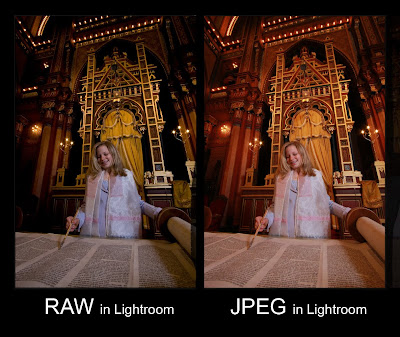

I got the same result in each case of my RAW-JPEG combo shots. Why has Lightroom made the change? I also got the same result in Camera Raw - the RAW image was substantially different in color balance from the Jpeg yet camera settings obviously were the same in both shots. Like I said, "I Don't Think I'm Dumb, Maybe I'm Just Stupid!!"
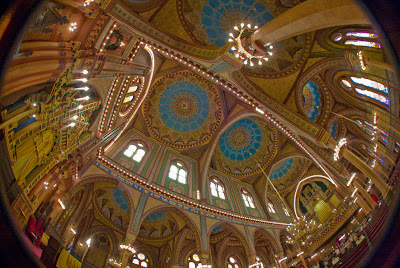
Now, dear readers, on another note - this is where I may repent and change my life. I started playing around with a few more RAW images in Lightroom and Loved! the results I was getting. I could easily save the highlights, recover the shadows, and pop the vibrance. Check out my fisheye image of the temple ceiling from Saturday morning - pretty cool.


I have to say, the extremely positive experience gave me cause to consider shooting my next gig completely in RAW - all 4000 shots! (Did I really type that?) Boy, if I switch to RAW, I'll have to give up all my Jpeg jokes. Anyway, I'll keep you posted as I walk through that valley of Raw ;~)

Tuesday, November 27, 2007

And Speaking of World Religions - JPG vs. RAW Again

Our good buddies over at Luminous-Landscape (one of my favorite sites) have yet another really good article on the subject - good content and well illustrated. Now they are from the tribe of "Raw" and show the the clear advantages over JPEGS - visually, of course. I'm from the tribe of "JPEG" and probably will never be saved. Please, no emails - keep smilin' and enjoy the Luminous-Landscape article right here.

Thursday, November 15, 2007

JPEG or RAW - One of the Three Religious Arguments in the Digital World

Of course the other two are Canon vs. Nikon and MAC vs. PC, but back to religious argument #1 - JPEG vs. RAW. OK, OK, I'm coming out of the closet. I'm a JPEG shooter. Please no emails. It's fast post production on my 3000- 4000 wedding images, takes up much less hard drive real estate, and gets the job done. I routinely print 24x36 images, often even larger and all the daily image postings were shot JPEG - 'nuf said.

But who else is a JPEG shooter? You might be a bit surprised. My good buddy and great commercial photographer, Will Crocket, over at ShootSmarter.com is a JPEG shooter. By the way, he has a very cool site - go check it out right here. Another JPEG shooter is our buddy, world renowned wedding photographer, Gary Fong. You can read his bio right here. Another former JPEG shooter was David Hobby over at the Strobist. He was featured in an interview over at That's My Monkey right here. He confided in the interview that when he was shooting a lot of images in a day, he shot JPEG but has switched to RAW since. In any event, why does it have to be a "religious argument". Hey, it's what works best for your situation - JPEG vs RAW; Good vs Evil; Right vs. Wrong - hey just joking :~) By the way, here is a great article on the subject over at the KenRockwell.com right here - it goes covers the discussion very thoroughly and is a good read.